-
What exactly is the idea behind the NExt portal?
NExt provides all of its services and features in a modern and intuitive portal.
One important aspect is that similar functionalities are presented to users in a standardised way (NExt basic services). From the user’s perspective, the design will always be the same regardless of the business unit with which they are ultimately exchanging information or data.
What are “interactive services”?
In NExt, standalone business unit applications will be offered in the form of interactive services.
Examples of such services from ExtraNet are the reporting platforms for banking supervision and statistics, the EBS, BBS and OMTOS bidding systems, and WebEDI and WebCRCMV for cash management.
What help and support functions will NExt offer and what implications will these have?
NExt offers users a context-sensitive help function for each page. It is intended that explanations and information will be provided for each topic. For example, Submission and status indicator includes additional dedicated explanations for various business topics. Informative and appropriate explanations should reduce the number of errors and queries.
What benefits will NExt email notifications offer in the future?
NExt offers users a wide variety of options for receiving emails with information about new processes in the portal. These email notifications can be activated or deactivated individually. In this way, users can ensure that they never miss important and, in some cases, time-sensitive information.
Basic services that can be used with email notifications include, for example, the registration process (including user managers), Submission and status indicator, Provision [Download area], and Dialog.
-
Which basic services are offered in NExt?
NExt offers a variety of basic services. These include functionalities that are required by a wide range of business units. At the same time, these basic services serve to standardise the Bundesbank’s external communication. The aim is that users will be able to use the same services with standardised functionalities for similar specialist use cases across the various business units of the Bundesbank. Business units that wish to use or offer functionalities included in NExt’s basic services should follow the principle of “one face to the customer” and should not provide their own comparable competing services alongside NExt. “One face to the customer” stands for consistent and standardised design via both the API and GUI.
Standardisation benefits users by providing them with a single, uniform method of accessing comparable services with consistent content and functionalities across different business areas.Selected basic services:
- Registration process (including user managers)
- Submission and status indicator
- Provision [Download area]
- Dialog
- Reporting calendar
- To-do list
- Email notifications
- Information and regulations
- Support and help function
- APIs/interfaces
-
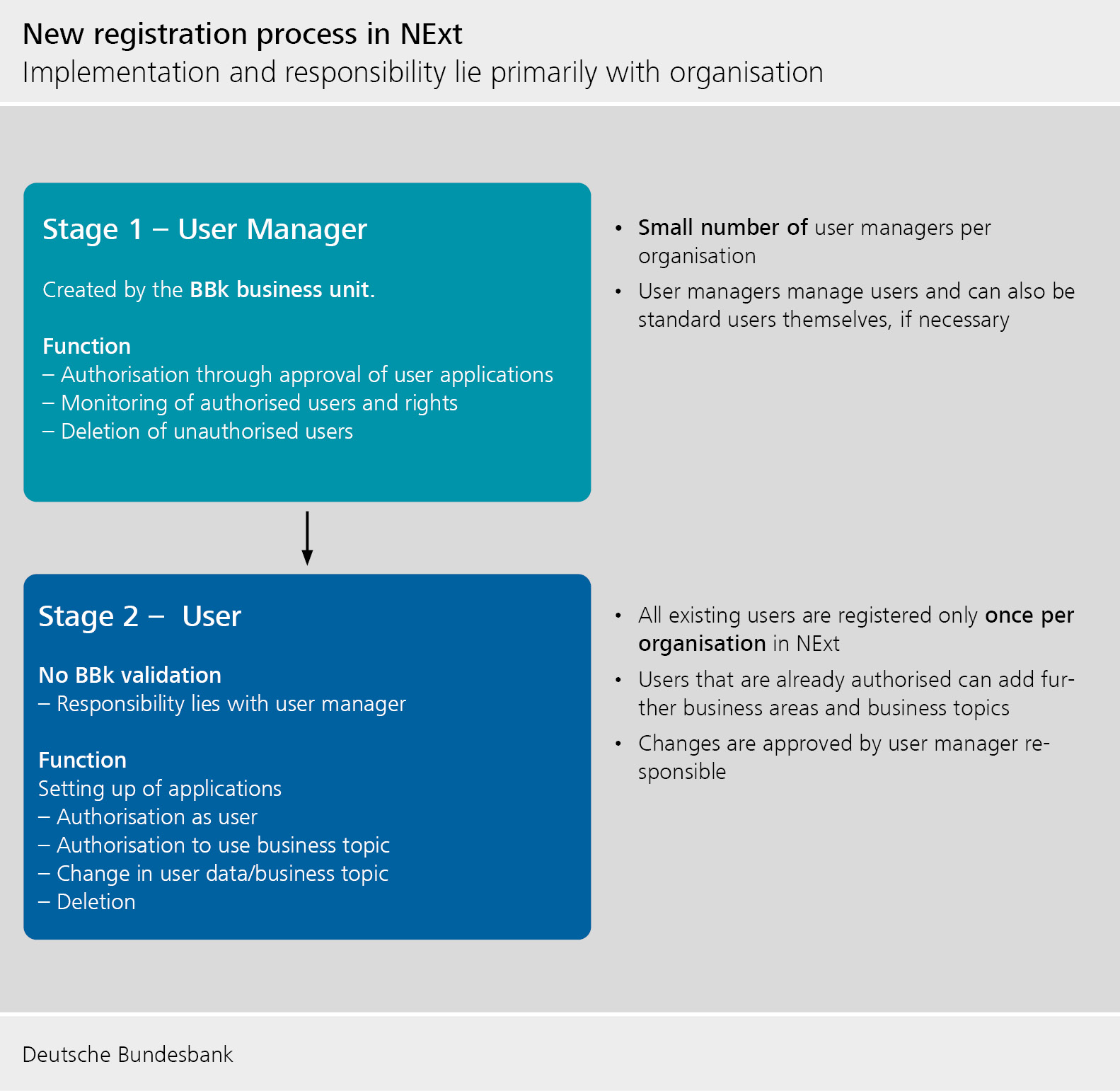
User registration – what’s going to change?
Generally, the registration and administration of the users is handled by the enterprises themselves.
The following procedure is used for registration:
User Manager
The user managers are created by the business units of the Deutsche Bundesbank.
- There may be one or several user managers per organisation.
- Task: Approval of registration or changes in user rights, creation or deletion of users, overview of existing users (= user administration).
User
- Task: Organisation self-registration and use of the required business topics.
The role of the user manager and the user can be performed by one person (e.g. in the case of smaller enterprises). For example, a user with a user ID can be both a user of the business topics and a user manager.
One registration per user (in an organisation) is required. A previously registered user may be granted access to other business topics at a later date.
Bundesbank-internal specialist administrators have access to user management and can, where necessary, create, block, delete, etc. user managers and users.
Can a user manager also be a regular user?
Yes, this is possible.
Can multiple user managers be designated for a single business area?
At least one user manager must be designated for each business area. However, it is recommended that several user managers be designated to each business area in order to prevent any disruptions to service in cases of absence (e.g. holidays or illness). There is no maximum number of user managers per organisation.
Can the user manager receive an overview of all his users?
User managers receive a complete overview if they are authorized for all business areas.
Authorisation of external users via alternative procedures
For organisations that cannot be checked against the commercial register (e.g. in the cases of organisations domiciled abroad, registered associations, individuals) alternative authorisation procedures will be possible. An alternative procedure is the definition of user managers by BBk business unit administrators.
Two-factor authentication (2FA) – How will this be implemented and what second factors will be permitted?
In addition to using a password, it is planned that two-factor authentication will be mandatory for logging into NExt.
Several variants of the second factor are offered (authenticator app, SMS and e-mail). For security reasons, the Bundesbank recommends using the authenticator app.
How many steps does the registration process have?
With the introduction of NExt, registration will be a two-step process. In the first step, the user managers will be designated by the Bundesbank’s business units. The user manager can then create, invite and manage users.
The Bundesbank may expand the registration process in the future.
What email address should be used for registration?
A user account should be assigned to a person. For this reason, it is recommended that a personal email address be used for a user account, rather than a functional email address.
Can NExt operators and specialist administrators change user rights and delete users?
Although it is planned that the Bundesbank will no longer be involved in the registration process, it will still be possible for the Bundesbank to provide support in user administration.
What are the rules for passwords in NExt?
To protect the user account, a secure password must contain at least ten characters. It must contain a capital letter, a lower case letter, a number and a special character. The password rules are shown at registration and when changing the password.

-
Dialog function in NExt – What is it? What can I use it for?
The Dialog function in NExt offers secure communication with external users. This comprises the secure exchange of information in the form of messages, including the associated file attachments.
-
Submission and status indicator [formerly File transfer]
Unlike ExtraNet, NExt will no longer feature one mailbox per business topic. Instead, submissions will be made centrally in one location. A common file naming convention must be followed in order for submissions to be allocated to the relevant business topics (and thus the appropriate internal business areas). There will be an alternative procedure for business units in which file names are always subject to external requirements, for example.
Submissions will undergo extensive checks (file name, authorisations, etc.).
In future, users will be able to see an overview of the current processing status of their submitted files and any checks that have been completed. In NExt, the results of the checks will now be reported for all business units and shown in the Status indicator in a clear and standardised format. This includes checks that are carried out in NExt and also those performed in subsequent Bundesbank business areas. This information will be made available to external users via the API and GUI, so that each user can choose the most appropriate format for themselves.
Feedback files, which in ExtraNet are made available for download separately from the submitted files, will be able to be shown directly at the time of submission. In addition to being provided with status information and feedback files in NExt, it is planned that external users will have the option of receiving notification by email. Each user will be able to select the types of feedback and stages of the checking process for which they wish to receive email notification.
For submissions, service providers/computer centres/authorised third parties will still be able to submit data on behalf of (other) reporting entities/organisations. A new function in NExt will allow both the submitter and the actual reporting entity to view this feedback.
NExt filenaming convention
Specialisttopic.Prod/Test.Filetype.Identifier.Date. Servicefields.Fileextension
Field/pointer
Mandatory?
Definition
Format
1
Business topic
Yes
Value from the list of available short names for business topics
2
Prod/Test
Yes
Production (live) or test
P = Production
T = Test3
File type
Yes
Different types of submissions within a business topic
Alphanumeric + “_”
Max. length 164
Identifier
Yes
Identifier allocated by business topic
See allocation in business topic business area
5
Date
Yes
Reporting date, other reference date, submission date, etc.
YYYYMMDD
6
Service fields
No
For individual purposes of business topics
Alphanumeric + “_”
7
File extension
Yes
=> “.” is not permitted as a character within a pointer because it serves as a separator between pointers.
How long can the name of a submitted file be?
The name of a submitted file may be up to 100 characters long.
What happens if a file is submitted to a business topic using the NExt filenaming convention but an incorrect file name has been used? Can the user then manually assign it to the appropriate business topic?
It is not possible to manually assign the relevant business topic to such a file at a later date. Only business topics that do not use the NExt filenaming convention can be selected for “manual assignment”.
What date should be entered in the “Date” column of the status indicator?
This is a date function that may have a different meaning depending on the business topic. It may be a reporting date, some other reference date or the date of submission, for example. Since the field should contain such different date functions, a general term was deliberately chosen for the field.
Can a submitted file be downloaded from the status indicator in order to view the file’s contents?
As NExt is not an archive, the Bundesbank decided against this in principle. The (technical and business) submitter ought to know the contents of the submitted file.
-
How often can a submitted file be downloaded?
A submitted file can be downloaded as often as required. Only once the download has been confirmed is it no longer possible for any other users in your enterprise to download the file.
Can a file whose download has been confirmed be downloaded and its contents viewed again from the provision overview or the details page?
As NExt is not an archive, this is not possible. The file is only available for download until a user confirms the download. After that, the file can no longer be downloaded and it is no longer available in NExt. A file can only be confirmed once it has been downloaded by a user at least once. A corresponding message on the overview page and the details page informs the user of this.
-
What is the new reporting calendar in NExt?
The newly developed (reporting) calendar provides external users with an overview of all submission deadlines for their relevant business topics. For business topics that require reports and/or submissions, the calendar is linked to the Submission + status indicator function. This means that the calendar displays whether reporting requirements still have to be fulfilled for business topics on specific dates.
-
What is shown under “Information and regulations”?
Business units have the option of displaying all the current information and documents that their users require on a particular business topic in one place in NExt and, if necessary, providing links to the Bundesbank’s website. There are plans to provide the option of sorting or restricting this information according to business topic. The widget is shown on the Next start page.
This can be used to provide users with specific news or new information.
-
Migration – Will there be a migration from ExtraNet to NExt?
As the process of registering users will be completely overhauled, there will be no migration from ExtraNet to NExt. Users will need to re-register in NExt.
Is it necessary to completely re-register all of my existing users when changing my business area over to NExt?
As a general rule, all Extranet users must re-register in NExt. If these users are already authorised for other business topics in NExt when your business unit changes over to NExt, they will only need to update their authorisations.
When will users be informed of the changeover date?
You will be informed on time by your business unit and the NExt service team. Lead time will be factored in for preparation and technical changes prior to the changeover and there will be sufficient time for testing.
-
Whom can I contact if I have any further questions?
You can contact the NExt service team or the contact persons in your business area.
-
To what extent will APIs play a role in NExt?
The topic of APIs (application programming interfaces) is becoming increasingly important for users. In NExt, users can select the interface (API or GUI) that best suits their needs.
Where it makes technical sense, NExt basic services can also be used via modern REST APIs.
A provisional version of the documents required for this can currently be obtained on request (email).
Is there any (provisional) API documentation for NExt yet and how do I obtain it?
There is some documentation on the interfaces that indicates NExt’s current level of development. If you are interested in receiving the documentation, please let us know by sending us an email. Do not hesitate to contact us if you have any comments, questions or feedback. The document is (still) labelled as a draft as there are corporate design and layout requirements for official Bundesbank documents. There are only a few small changes to the document as things stand; these will be almost entirely the result of subsequent developments in the application.